In the rapidly evolving world of visual communication, having the right software for your screens isn’t just an advantage — it’s a must. If you’re exploring digital signage for your business, you’re probably wondering: “What are the best options in 2025?” This article dives into the top digital signage platforms of the year, what sets them apart, and how to pick the right one for your scenario.
Why Digital Signage Software Matters in 2025
Digital signage has moved far beyond simple slide-shows on screens. With cloud-based platforms, AI capabilities, remote control, integration with live data, and a broad variety of hardware options, the software you choose will define how flexible, scalable, and effective your display network becomes.
According to industry analysis, a handful of features consistently separate the best from the rest: ease of deployment, scalability, hardware support, content flexibility, and analytics.
With that in mind, let’s explore the top contenders for best digital signage software in 2025.
Top Digital Signage Platforms of 2025
ScreenCloud
Screen Cloud consistently ranks among the top because of its broad hardware compatibility, strong integrations (Google Drive, Slack, social media), and user-friendly interface. It’s especially well suited for multi-location businesses or franchises where consistency across screens matters.
Highlights:
- Cloud-based platform with drag-and-drop content management.
- Supports various OS/devices including Android, Windows, ChromeOS, macOS.
- Good for enterprise and SMB alike.
When to use: If you have several locations, want remote access, or need to integrate with workplace tools (Slack, Google Workspace, etc).
Yodeck
Yodeck stands out for affordability, simplicity, and hardware flexibility. It supports Raspberry Pi players, making it budget-friendly for small to medium businesses.
Highlights:
- Free plan for a single screen (great to trial).
- Remote cloud management, scheduling, content widgets.
- Strong user-rating baseline (Yodeck receives high scores in reviews).
When to use: If you’re just getting started, have fewer screens, or need a cost-effective option without sacrificing quality.
NoviSign
NoviSign excels in dynamic and interactive content with templates, real-time updates, and a strong presence in education and healthcare.
Highlights:
- Rich template library for sectors like schools and hospitals.
- Real-time analytics and interactivity features.
- Supports multi-screen, multi-location setups.
When to use: If you’re in an environment where you need engaging visuals, interactive kiosks, or frequent content changes.
OptiSigns
OptiSigns is noted for cross-platform support and flexibility. Whether you’re using Android, Windows, Linux, or Fire Stick, it has strong hardware compatibility.
Highlights:
- Multi-platform device support.
- Offline playback capability, robust scheduling, team collaboration features.
- Suitable for mid-sized businesses aiming to scale.
When to use: If device diversity matters to you, or you anticipate managing signage across different hardware types.
PosterBooking
PosterBooking often comes up as a standout for budget-conscious users and small-business deployments. It offers a free tier and supports devices like Fire TV, Android, PC.
Highlights:
- Free plan supporting up to 10 screens (in some cases) — great for SMEs.
- Easy setup, minimal hardware requirements.
- Ideal for small shops, cafés, or startup roll-outs.
When to use: If you have a small number of screens, limited budget, or want to test digital signage without heavy investment.
Scala
Scala is more of an enterprise-level choice — built for large networks, complex deployments, and heavy content/analytics needs.
Highlights:
- Strong analytics, audience measurement, customization.
- Supports large scale deployments with many screens, interactive zones, etc.
- Higher cost, more complexity, but high power.
When to use: If you manage hundreds of screens across geographies, need detailed insights, and have a larger budget.
Key Features to Compare in 2025
When comparing options, keep these features in mind — they’re what differentiate the best from the mediocre:
- Hardware & OS support: Does the software work with Android, Windows, Raspberry Pi, Fire Stick?
- Cloud vs on-premises control: Remote management is now critical for many businesses.
- Content scheduling & automation: Can you automate updates, deploy to multiple screens, and schedule by time/location?
- Offline playback: If the internet fails, will your screens still run?
- Analytics & reporting: Tracks engagement, screen usage, content performance.
- Integrations: With social media feeds, live dashboards, POS data, Google/Office tools.
- Ease of use & onboarding: Drag-and-drop editors, minimal technical barriers.
- Cost & scalability: Pricing per screen, contract terms, expansion support.
- Support & reliability: Vendor support, uptime guarantees, user reviews.
How to Choose the Best for Your Needs
No single platform is “best” for everyone — it depends on what you’re trying to achieve. Here’s a quick checklist:
- Define your use case: Are you in retail, education, hospitality, corporate internal signage?
- Count your screens: One location? Multiple? Across cities or countries?
- Know your hardware: Do you have TVs, kiosks, Raspberry Pi players, old devices?
- Budget constraints: What can you spend monthly per screen? Free tiers vs enterprise.
- Future growth: Will you scale to more screens, locations, or need advanced interactivity?
- Content needs: Static images? Videos? Live feed? Touch interactivity?
- Technological environment: Do you need integrations with internal systems (CRM, POS, IoT)?
- Support & reviews: What are current users saying? Check software review platforms.
Trends to Watch in 2025
The digital signage software space isn’t static — here are some emerging trends:
- AI-driven content & scheduling: Platforms beginning to recommend what content to show based on audience data.
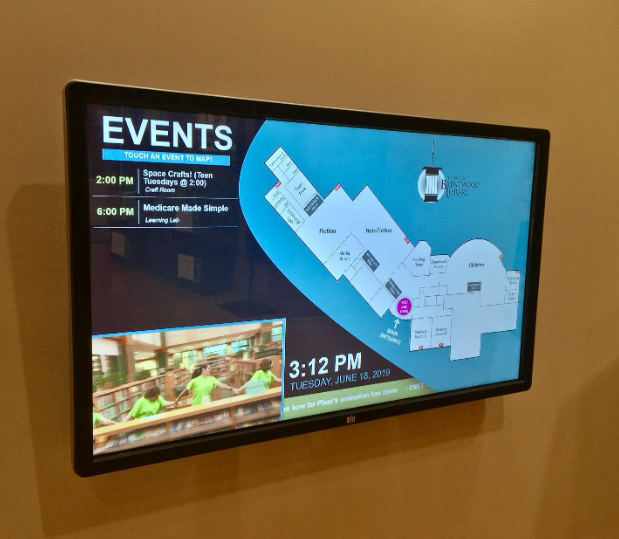
- Interactive and touch-based signage: More screens are becoming interactive kiosks rather than passive displays.
- Cross-device flexibility: Using devices like Fire TV, Raspberry Pi, Android TV to reduce hardware cost.
- Integration with live data and IoT: Real-time dashboards, live sales data, weather feeds, social streams all feeding into signage.
- Greater focus on ease & DIY deployment: Especially for small businesses wanting quick, hassle-free setup.
Final Thoughts
If you’re looking for the “best digital signage software in 2025,” the answer really comes down to matching your needs with the right platform. For small businesses and budget-friendly roll-outs, PosterBooking or Yodeck are excellent places to start. For enterprise-scale or multi-location deployments, ScreenCloud, OptiSigns or Scala might be better fits.